DMX Core 100 is a supported integration on Advatek's own systems list. Discover PixLite® controllers automatically, push Art-Net or sACN to them in one click, and keep an eye on every board's health — all from one place.
Advatek's PixLite® controllers are a standard for driving large pixel installations. DMX Core 100 pairs with them directly using Advatek's own discovery protocol and JSON configuration API — so setup that used to mean spreadsheets of IPs and universes becomes a scan-and-click job.
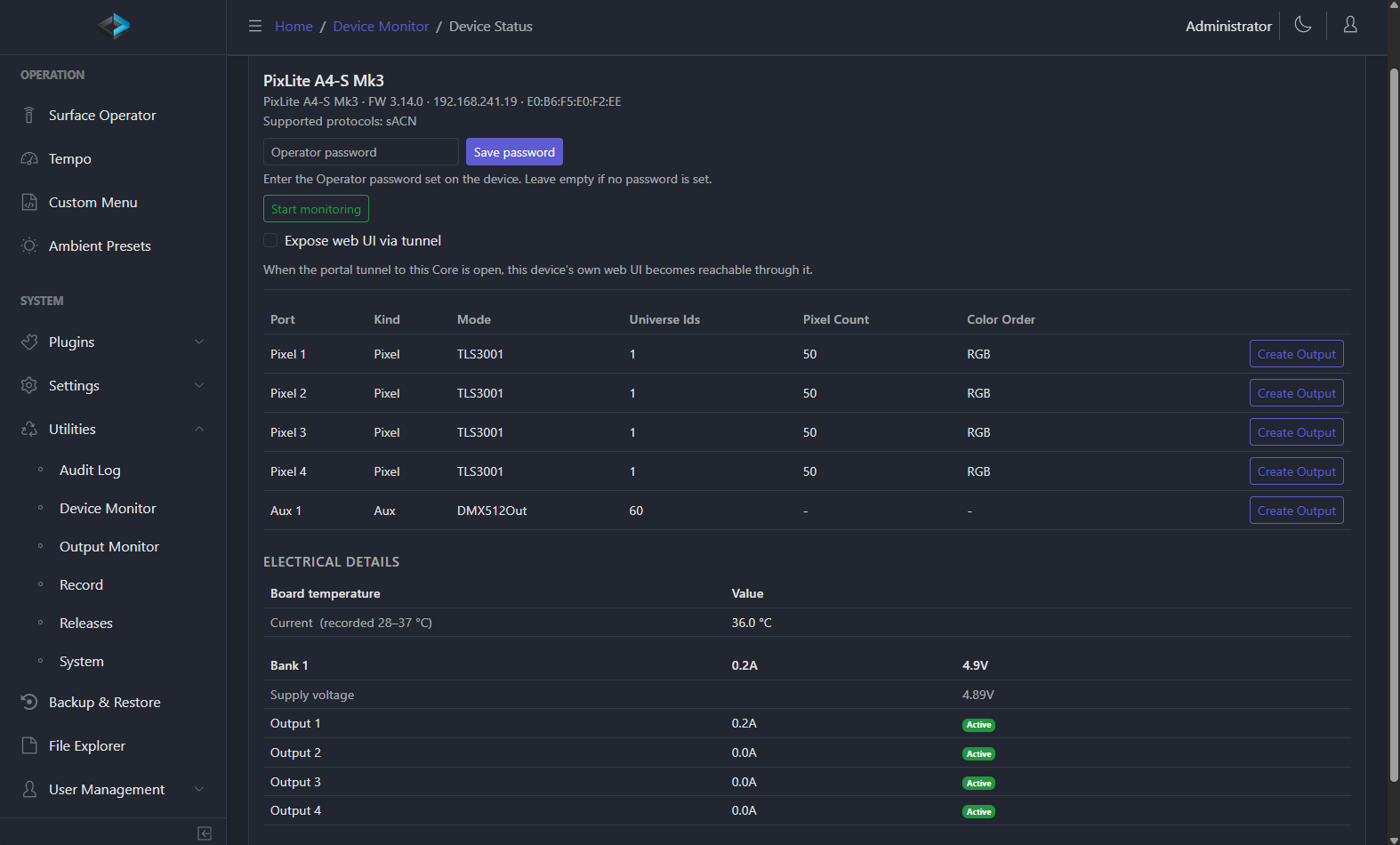
Because the integration is native on both sides, DMX Core doesn't just stream pixels to a PixLite® — it reads the controller back: model, firmware, board temperature, power-bank voltage, and per-output current. Your lighting controller and your pixel hardware finally share one screen.
Every part of the integration targets the specifics of Advatek hardware — not a generic Art-Net node.
Scan the network and DMX Core finds every PixLite® controller automatically — no manual IP entry. It reads each device's model, firmware version, IP, MAC address, and nickname so you know exactly what's out there.
Create Art-Net or sACN outputs to a controller's pixel and auxiliary (DMX) ports in a single click. Destination IP and universe settings are pre-filled straight from the device's own configuration, so streams line up the first time.
Watch board temperature (current, min, and max), supply voltage per power bank, and per-output current draw with fuse status. DMX Core flags overcurrent conditions and disconnected pixel runs before they become a callback.
Pin each controller's firmware and port configuration — universe, pixel count, and color order. If firmware changes or a port is reconfigured unexpectedly, DMX Core alerts you and logs it, so an install stays exactly as commissioned.
Periodic reachability polling with event logging means you'll know the moment a controller drops off the network — not the next time someone walks past the display.
For password-protected controllers, DMX Core stores the credential securely and reuses it automatically for subsequent queries — enter it once and monitoring just keeps working.
The whole PixLite® workflow, start to finish.
DMX Core discovers every PixLite® controller on the network and lists model, firmware, and address details.
One click creates Art-Net or sACN outputs to the pixel and auxiliary ports, pre-filled from each device's config.
Build scenes, effects, cues, and timelines in DMX Core and stream them straight to your pixel fixtures.
Lock firmware and port config, then watch temperature, voltage, and current live — with alerts on drift or disconnects.
Supported hardware: Any Advatek PixLite® pixel controller that supports the standard Advatek discovery protocol and JSON configuration API. Both pixel and auxiliary (DMX) ports are supported.
The combination shines anywhere large pixel arrays need to run unattended, reliably, for years.
Drive building-scale pixel runs and keep tabs on power and temperature across dozens of controllers from one dashboard.
Schedule and trigger pixel shows, and get alerted the instant a controller drops or an output over-draws.
Commission a look once, pin the config, and let drift detection guarantee it stays that way through staff turnover and updates.
Download DMX Core 100 free in full-feature demo mode, scan your network, and see your Advatek controllers show up — no signup required.
PixLite® and Advatek® are trademarks of Advatek Lighting Pty Ltd. DMX Core is not affiliated with Advatek beyond the described integration partnership.